OpenCode Chat Bridge: Putting a Coding Agent in Your Group Chat
For busy humans
OpenCode Chat Bridge puts a coding agent in the chat apps people use: Matrix, Slack, WhatsApp, Mattermost, Discord, Telegram, and the web. It speaks ACP to the agent, keeps one session per conversation, and blocks tool calls at the execution level, so no message can make it run commands.
An agent in a terminal is not the same as an agent in a chat
A coding agent lives in a terminal. That terminal has one person in it, and that person is accountable for everything that happens.
Chat is the opposite. A group chat has ten people, threads that nobody fully follows, and messages that arrive out of order. The moment a message can trigger a tool call, the question stops being "how do I make this work" and becomes "what happens when someone in the group asks the wrong thing".
I wanted to use my coding agent where my team already talks, without giving everyone in the room a way to run commands on my machine. The result is OpenCode Chat Bridge, a service that puts an agent behind a chat bot. It has picked up more than 100 stars on GitHub, and its Docker image has been pulled around 10k times.
The interesting part was never the bot. It was the boundary between the agent and the tools.
A protocol for the agent boundary
The first decision was how to talk to the agent. The obvious option is an HTTP API, but coding agents were not built as services. They are programs with a working directory, a session, a context window, and tools that run on the machine.
The Agent Client Protocol, or ACP, fits that shape. It is a JSON-RPC conversation over stdio, and the agent side is a process the bridge starts and talks to. The bridge uses the @agentclientprotocol/sdk package, currently at version 0.13.
┌──────────────────┐   ACP / JSON-RPC   ┌──────────────────┐
│  Chat connector  │◄──────────────────►│   Agent process  │
│  Matrix, Slack,  │    prompt, update   │  OpenCode,       │
│  Telegram, ...   │                    │  Ferrum, ...     │
└──────────────────┘                    └────────┬─────────┘
                                                   │
                                                   ▼
                                        ┌──────────────────┐
                                        │  Local tools     │
                                        │  MCP servers     │
                                        └──────────────────┘
The useful property of ACP here is that the agent is pluggable. The backend is configured with a command, its arguments, an identity, and a profile directory:
{
  "acp": {
    "command": "/usr/local/bin/ferrum",
    "args": ["acp"],
    "backendId": "ferrum",
    "profileDir": "./profiles/ferrum-chat"
  }
}
OpenCode is the default. Ferrum, the small Rust-native agent I built, works as a backend too, and the bridge documentation records it as validated for things like per-thread workspaces, cancellation, session resume, and restrictive workspace policy.
The profile directory matters more than it looks. Each connector and conversation gets a deterministic working directory, and the profile is copied into it before the agent starts. That is how backend-specific policy, instructions, and skills travel with the session.
One session per conversation
Some chat platforms split a room into threads, and a thread is a conversation that deserves its own context. If a Slack thread about a database migration and the channel around it shared one agent session, both would end up with the other's history in the window.
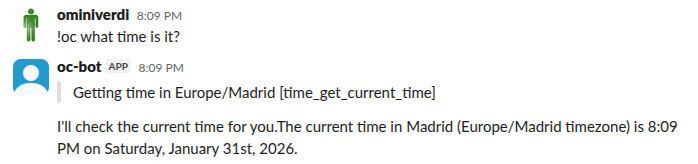
So the bridge isolates them, where the platform has threads to isolate. Slack, Matrix and Mattermost key a session on the thread root, and Telegram does the same for topics in forum groups. Discord has no such split, so a session covers the whole channel. WhatsApp has no threads at all, so a session covers the whole chat.
Each session maps to its own working directory and its own agent session, and the mapping is stored on disk with the session id, the canonical working directory, and the backend identity. Sessions survive a restart of the bridge, and /clear deletes both the mapping and the backend session.
There is also a session picker, which lets a chat user switch a conversation to an already saved agent session. It is disabled by default, and that default is deliberate: it exposes saved working directories, session titles, and recent history, which is not something to leave open in a shared room.
Permissions belong to the agent
This is the part I care about most, and the part that changed my mind about how to build this.
The usual way to restrict a bot is to write a system prompt. Do not read files. Do not run commands. It works right up until someone types the right sentence, and then it does not work at all.
Prompt-based restriction is a suggestion. The model can be talked out of it, and no amount of careful wording changes that. A group chat is exactly the wrong place to rely on a suggestion.
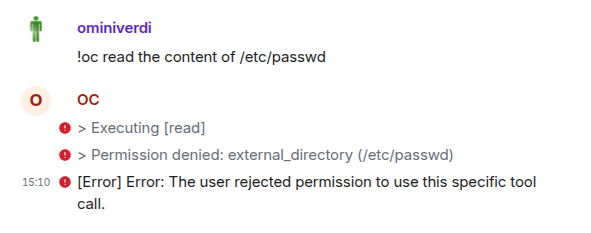
The bridge takes the opposite approach. The agent checks its own permission rules before any tool runs. If a tool is denied, the call is blocked and the model receives the denial as the tool result. The permission map also decides what the model is offered. Denied tools and denied MCP servers are filtered out of the tool list before the request goes out, so the model has nothing to call. The denial holds no matter what the prompt says.
{
  "default_agent": "chat-bridge",
  "agent": {
    "chat-bridge": {
      "permission": {
        "read": "deny",
        "write": "deny",
        "edit": "deny",
        "bash": "deny",
        "glob": "deny",
        "grep": "deny",
        "task": "deny",
        "webfetch": "deny",
        "question": "allow",
        "time_*": "allow",
        "weather_*": "allow",
        "web-search_*": "allow"
      }
    }
  }
}
The pattern is simple: deny the built-in tools, then allow a small list of specific capabilities. MCP tools follow the same rule under a <server>_<tool> name, so a wildcard such as web-search_* allows every tool that server exposes and nothing else.
Tool permissions decide what the agent can do once it is talking. They do not decide who gets to talk to it. Every connector has an allowedUsers list, and a message from anyone outside it is dropped before the agent sees it. Leaving the list empty allows everyone, so on a shared connector that is the first thing to set.
Two deployments, two policies
On my own phone I want the whole agent. That deployment allows read, write, edit and bash, and it runs against WhatsApp with respondToOthers set to false, so only messages from my own linked account can trigger it. The tool policy is wide open and the audience is one person.
This is the opencode.json for that deployment:
{
  "default_agent": "chat-bridge",
  "agent": {
    "chat-bridge": {
      "permission": {
        "read": "allow",
        "write": "allow",
        "edit": "allow",
        "bash": "allow"
      }
    }
  }
}
Tools that are not listed fall through to ask, and in a chat there is nobody to answer, so the bridge refuses them. That is why this file can stay short and the group config below has to deny tools explicitly.
And this is its chat-bridge.json, which keeps the audience at one person:
{
  "whatsapp": {
    "respondToOthers": false
  }
}
In a group room I want the opposite. That deployment denies the shell and the filesystem, and starts the MCP servers the room actually needs: one that plots a chart, one that queries a database, one that generates a report. Each server's tools are allowed by server name, with a wildcard covering everything that server exposes.
This is the opencode.json for the group deployment:
{
  "default_agent": "chat-bridge",
  "mcp": {
    "report_generator": {
      "type": "local",
      "command": ["npx", "-y", "report-generator-mcp"],
      "enabled": true
    },
    "chart_builder": {
      "type": "local",
      "command": ["npx", "-y", "chart-builder-mcp"],
      "enabled": true
    },
    "db_query": {
      "type": "local",
      "command": ["npx", "-y", "db-query-mcp"],
      "enabled": true
    }
  },
  "agent": {
    "chat-bridge": {
      "permission": {
        "read": "deny",
        "write": "deny",
        "edit": "deny",
        "bash": "deny",
        "glob": "deny",
        "grep": "deny",
        "task": "deny",
        "webfetch": "deny",
        "web-search_*": "allow",
        "report_generator_*": "allow",
        "chart_builder_*": "allow",
        "db_query_*": "allow"
      }
    }
  }
}
The room gets search, charts, database queries and reports, and no path to a shell.
These are two deployments, not two rooms in one. The bridge copies opencode.json into each session directory from the directory the process runs in, so a policy belongs to a deployment and every thread in it shares that policy. Running the personal bot and the team bot side by side means two directories with two config files, or two containers each mounting its own.
services:
  personal:
    image: lbecchi/opencode-chat-bridge:latest
    container_name: opencode-whatsapp-personal
    environment:
      - CONNECTOR=whatsapp
      - WHATSAPP_AUTH_DIR=/data/whatsapp-auth
    volumes:
      - personal-sessions:/data/sessions
      - whatsapp-auth:/data/whatsapp-auth
      - ./personal/opencode.json:/app/opencode.json:ro
      - ./personal/chat-bridge.json:/app/chat-bridge.json:ro

  team:
    image: lbecchi/opencode-chat-bridge:latest
    container_name: opencode-slack-team
    environment:
      - CONNECTOR=slack
      - SLACK_BOT_TOKEN=${SLACK_BOT_TOKEN}
      - SLACK_APP_TOKEN=${SLACK_APP_TOKEN}
    volumes:
      - team-sessions:/data/sessions
      - ./team/opencode.json:/app/opencode.json:ro
      - ./team/chat-bridge.json:/app/chat-bridge.json:ro

volumes:
  personal-sessions:
  team-sessions:
  whatsapp-auth:
Each deployment gets its own session volume. Session directories hold the conversation history and the copied opencode.json, so the personal history and the team history should not live in the same place.
The two levers are independent. You can widen the toolset without widening the audience, or the other way around. The personal deployment uses the second control, respondToOthers, to keep the audience at one person while the tools stay wide. The team deployment uses the tool policy to keep the audience wide while the tools stay narrow.
None of this is a sandbox. An allowed tool still runs with the permissions of the process that runs it. The mitigation is narrowness: specific tools, explicit users, and credentials kept out of the profile and the session store.
Seven chat surfaces
Once the model was right, adding platforms was the easy part. Each connector is a small program that translates between a chat platform and the ACP client.
| Platform | How it connects | Notes |
|---|---|---|
| Matrix | matrix-bot-sdk | End-to-end encrypted rooms, image uploads, one session per thread |
| Slack | Socket Mode | No public server needed, one session per thread |
| Baileys WebSocket | Scan a QR code once to link, one session per chat | |
| Mattermost | REST API and WebSocket | No external dependencies, one session per thread |
| Discord | discord.js | Mentions and direct messages, one session per channel |
| Telegram | Bot API, long polling | No webhook, file attachments, one session per topic |
| Web | WebSocket | Embeddable widget, one script tag, no built-in auth |
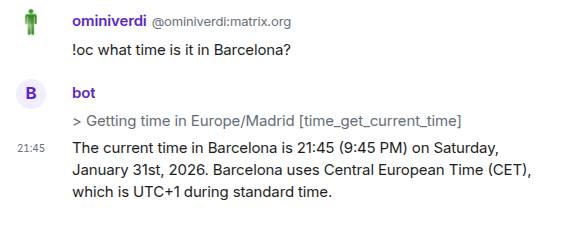
Matrix was the first one that made sense for me, because encrypted rooms are a room where you can talk about infrastructure without the conversation being visible to the server.
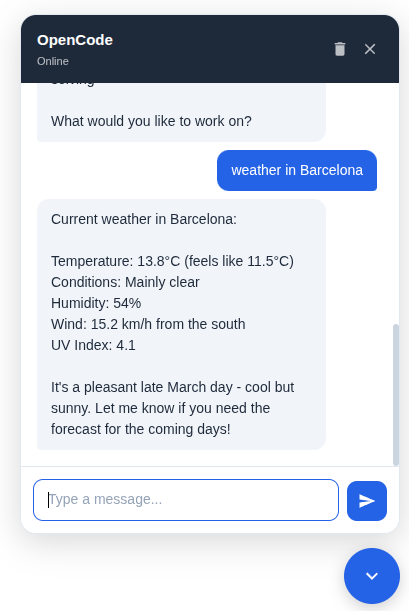
The web connector goes the other way. Instead of a bot joining a conversation, it is a widget embedded in a page, either as a floating bubble or filling a container. It streams over a WebSocket and it has no authentication of its own, so it belongs on a private network or behind a reverse proxy that does the authentication.
Showing what the agent is doing
A terminal shows tool calls because a terminal has a place to show them. A chat message does not, and that turns out to be a real usability problem rather than a cosmetic one.
The bridge has a global setting for how much of that activity reaches the chat. It can be off, it can send one immutable message per tool call, it can keep a single editable status message with the current tool, or it can keep an editable cumulative ledger of every call in the thread. The default is one message per call.
Two details make this work in practice. Arguments to a tool arrive progressively, so the status can update while the agent is still thinking. And the status message can be edited, which is what makes it an audit trail rather than a log dump.
Running it
It is a TypeScript project on Bun, and it runs from a checkout or from a container.
git clone https://github.com/ominiverdi/opencode-chat-bridge
cd opencode-chat-bridge
bun install
cp .env.example .env

# pick a connector
bun connectors/matrix.ts
bun connectors/slack.ts
bun connectors/telegram.ts
The Docker image is published as lbecchi/opencode-chat-bridge. The connector is selected with an environment variable, so a container runs one of them, and a compose file can start several. Sessions and the OpenCode data live in volumes.
Where it stands
The project started in January 2026 and the current release is v0.7.1. It is MIT licensed.
It is still actively developed. A client keeps asking for things the current connectors do not do yet, and other people contribute occasionally. The releases reflect that: v0.5.0 in July, v0.6.0 a week later, v0.7.0 in August, v0.7.1 in September. Between them they added a standalone web chat, configurable tool messages, and explicit-invocation flags for Mattermost, Slack, Matrix, and Telegram threads.
Signal is not supported, and there is a document explaining why.
What I learned
The first thing I got wrong was thinking the hard part was the connectors. Writing a second, third, or seventh chat integration is not hard. Each one is the same shape: translate a message into a prompt, translate the streaming updates back into chat messages, and keep a session per conversation.
The hard part is deciding what the agent is allowed to do, and making sure that decision cannot be changed by whoever is talking to it. That belongs in the agent, checked before the tool runs, in a configuration file the model can inspect but cannot overrule. Everything else in this project is plumbing around that one idea.
The second thing is that chat is a good surface for asking and a bad surface for driving. In a terminal I watch every step and review every diff. In a chat thread I can ask a question, get an answer, and keep the conversation. That is a genuinely different and useful mode, as long as the tool policy matches it.
That is also why Ferrum and this bridge fit together. Ferrum is small, starts fast, persists its sessions, and has explicit tool policy, which is exactly what a chat deployment needs. The agent is one side, the chat is the other, and the protocol between them is the part that stays boring.
Where the code lives
The source code is on GitHub:
https://github.com/ominiverdi/opencode-chat-bridge
And the agent it can drive is here: